
Tech Talk #1: Faster AI Training, Tissue Alignment, and more in Visiopharm platform
The first episode of the Visiopharm Tech Talks webinar series focused on helping users get more from the platform through new software capabilities, practical tips, and a preview of what’s coming next.
Hosted by Visiopharm expert, Dan Winkowski, PhD, the session highlighted recent innovations designed to make AI training faster, streamline annotation workflows, and help users get to results more efficiently.
Watch the recording of the session, or read the highlights below.
Faster and More Flexible AI Training
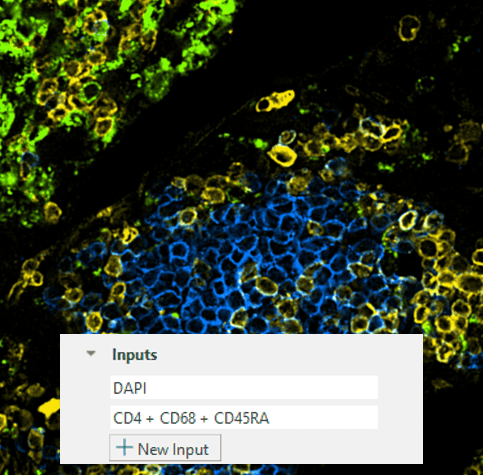
One of the key updates discussed was a series of improvements to AI training. According to Dan, recent platform enhancements have increased training speeds by up to 5x, helping users move from model development to production-ready workflows much faster.
The software now also supports combining multiple channels as inputs to AI models, including fluorescence channels and color deconvolutions. This allows users to provide richer information during training, helping create more robust and generalizable AI models.
New Annotation Experience
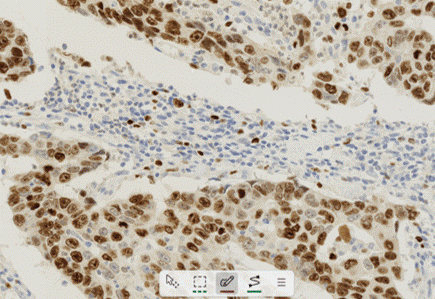
Dan highlighted the redesigned drawing tool as one of the most impactful updates in the latest release.
The new toolbar replaces the previous drawing wheel with a more intuitive, always-visible interface that supports keyboard shortcuts and works in both light and dark modes. With a smaller footprint in the viewer, it stays out of the way while making annotations faster and easier.
This is particularly useful when creating training data for AI models or selecting regions for downstream analysis.
Using Tissue Align to Connect Different Modalities
The webinar also showcased Tissue Align, Visiopharm’s multimodal image alignment technology.
Users can align images from different staining modalities, including H&E and multiplex immunofluorescence (IF), and either keep them as aligned layers or fuse them into a single dataset. This allows researchers to combine morphological information from H&E with molecular information from fluorescence markers.
Dan demonstrated how aligned datasets can help transfer annotations between image types, enabling what he described as a highly flexible, bidirectional workflow. For example, pathologists can annotate on H&E images and transfer those annotations to fluorescence data, or researchers can use fluorescence markers to guide annotations on H&E sections.
Building Better Training Data with Transfer Learning
A key theme throughout the session was improving confidence in AI training data.
Dan showed how users can identify specific cell types using marker-based stains, transfer those annotations to H&E images, and use the resulting labels to train AI models. For example, macrophages identified through CD68 staining can become training data for models that learn to recognize those same cells on H&E alone.
This approach helps users create high-quality training datasets while reducing the challenge of manually annotating difficult-to-identify cell populations.
Quick Start Apps for Faster Results
For users new to the platform, Dan strongly recommended Visiopharm’s Quick Start Apps.
These pre-trained applications are designed around common image analysis tasks and can deliver results immediately without requiring users to build workflows from scratch. The apps can also be retrained and customized with project-specific data when needed.
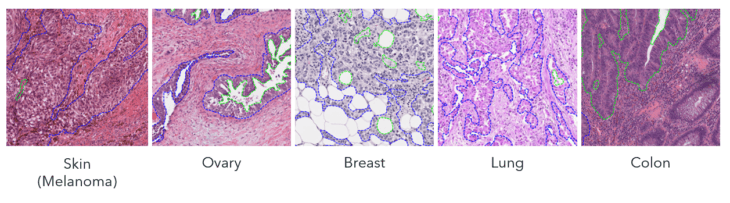
Among the latest additions is the H&E Tumor Detection Quick Start App, which has been trained across a broad range of tissues and staining conditions. The goal is simple: help users start generating meaningful results right away.
Dan also demonstrated how Quick Start Apps can significantly reduce annotation time by automatically identifying objects such as nuclei and providing a starting point for further AI training.
A Look Ahead
The session closed with a preview of a feature currently in development: enhanced clustering and visualization tools for unsupervised analysis.
The upcoming functionality will include hierarchical clustering with an interactive dendrogram, heat maps, and gallery views designed to help users explore complex datasets, including protein and transcript data at the single-cell level.
Key Takeaway
From faster AI training and improved annotation tools to multimodal image analysis and Quick Start Apps, the first Tech Talks session focused on one clear goal: helping researchers work more efficiently and get to meaningful results faster.
As Dan concluded, these updates are designed to make it easier for users to develop workflows, train AI models, and generate data with greater speed and confidence.
Sign up to the next Tech Talk session here.
Share this article